Annotations
The Annotations Service provides the comments and discussion threads that users attach to the questions of plans and assets. It stores them separately from the main platform.
Usages
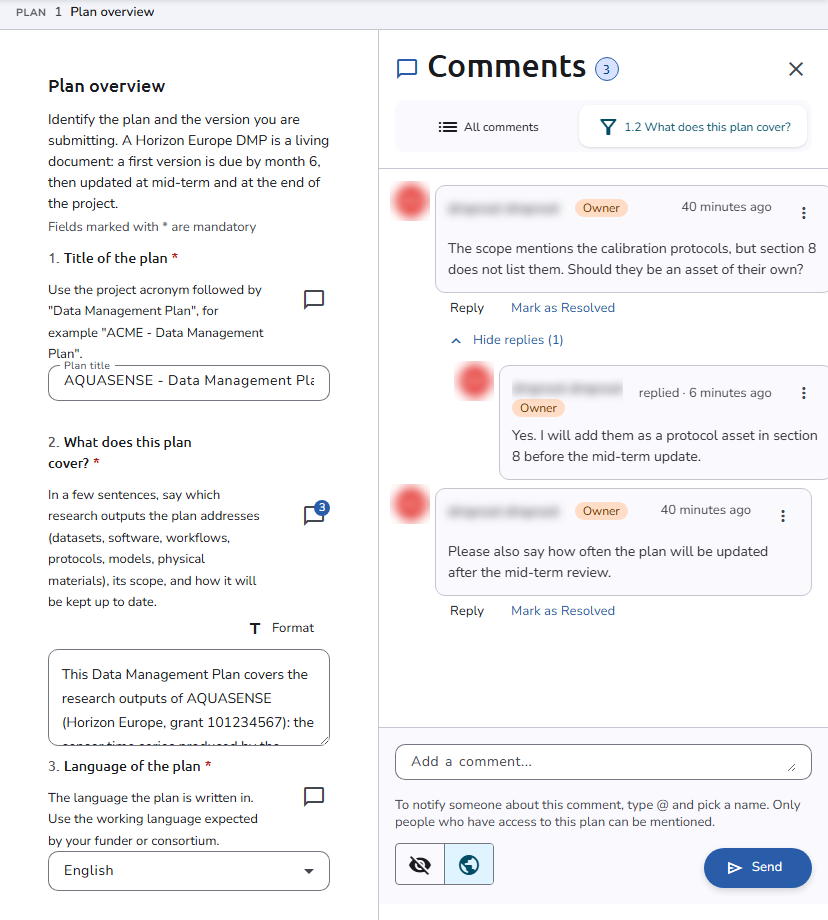
Users discuss the questions of a plan and of its assets in comment threads. Each question in the plan editor has a Comment button next to its title, with a badge that shows how many comments it has. Clicking it opens the Comments panel beside the editor, filtered to that question; All comments lists the comments of the whole plan, grouped by question. The comments button in the editor toolbar (View all comments) opens the same panel.
In the panel, users start a new thread with Add a comment... and Send, or Reply to an existing one. Before sending, the visibility toggle sets the comment to Hidden, which makes it visible only to its author, or Visible, which shows it to everyone with access to the plan. When a visible comment is created, the other users are notified. Comments that a user may change, such as their own, have a More actions menu with Edit comment and Delete comment.
Mention
Users can mention other users in their comments and replies by typing the @ symbol and then selecting the user from the dropdown that appears. Only people who have access to the plan can be mentioned, and they are notified.
Status
A comment thread can change its status at any time. When only one other status is available, a Mark as button (for example Mark as Resolved) appears under the comment. When several are available, a Change status button opens a menu with them. The current status is shown on the comment, and the other users are notified when it changes.
Comment statuses are created under Settings > Comment statuses. See Comment Statuses.
Copy link
Each question of the plan editor has a Copy Link button next to its title, which copies a direct link to that question to the clipboard. The notifications about comments carry a similar link, which opens the plan editor at the question with its comments shown.