In-App Notifications
In-app notifications are shown inside the platform. While you are logged in, the platform checks for new ones at a regular interval and shows the number of unread notifications on the bell.
Accessing notifications
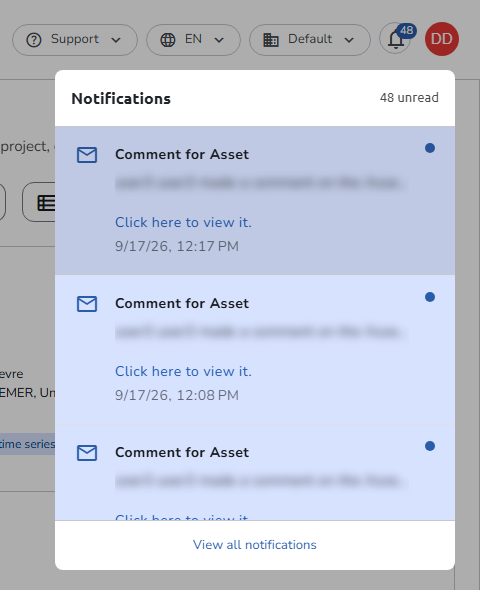
Click the notifications icon (bell) at the top right of the navigation bar, next to your profile picture. Its badge shows how many notifications you have not read yet.

The Notifications panel opens with your five most recent notifications and the number of unread ones. Unread notifications are highlighted and marked with a dot. From here you can:
- Click an entry to mark it as read and open its full text. The link in the text (for example Click here to view it.) opens the plan or asset it is about, or, for a comment, the question in the plan editor with its comments.
- Click View all notifications to open the Notifications page, a table of your complete history (state, subject, type, and date) that you can search and filter by Type and State (Unread or Read).
What triggers an in-app notification
The following events can generate in-app notifications:
| Event | Description |
|---|---|
| Plan invitation | You were invited to collaborate on a plan |
| Plan status changed | A plan you are involved in changed status |
| Plan finalized | A plan you are involved in was finalized |
| Plan modified | A plan you are involved in was updated |
| Plan deposited | A plan you are involved in was deposited to a repository and received a DOI |
| Plan evaluation completed | An evaluation was run on a plan you are involved in |
| Plan role added | You were assigned a role on a plan |
| Plan role changed | Your role on a plan was changed |
| Plan role removed | A role you held on a plan was removed |
| Plan access removed | Your access to a plan was removed |
| Annotation created | A comment was added to a plan or asset you are involved in |
| Annotation status changed | A comment's status was updated |
| Mentioned in annotation | You were @-mentioned in a comment |
| Asset created | An asset was added to a plan you are involved in |
| Asset modified | An asset you are involved in was updated |
| Asset status changed | An asset you are involved in changed status |
| Asset finalized | An asset you are involved in was finalized |
| Asset evaluation completed | An evaluation was run on an asset of a plan you are a member of |
| Asset template invitation | You were added to the users of an asset template |
| Organisation invitation | You were invited to join an organisation |
| Plan suggestion | An external system suggested a new plan, or changes to a plan |
| Account merge confirmation | A request to link accounts was initiated |
| Credential removal confirmation | A request to unlink an email was initiated |
Which of these events generate in-app notifications depends on the notification templates configured by your administrator. Users choose which channel comes first in the Notifications tab of their profile.