Conditional Questions
A question can stay hidden until an author gives a certain answer to another question. Hidden questions are skipped by authors and left out of downloads. Conditional questions work the same way in asset templates and plan blueprints.
Add a rule
Rules are set on the input whose answer decides, not on the question that is shown:
- In the Structure tab, expand the question that holds the deciding input.
- On the input, click the Show a question when… chip.
- Click Add rule. Each rule reads When answer show question:
- Pick or type the answer. The control matches the input: the options of a choice input, Yes or No for a yes/no input or a tick box, a date for a date input, a number for a number input, and free text otherwise.
- Pick the question to show. The list groups Questions and, for questions with more than one input, Single inputs, so you can also show one input of a question.
- Add more rules (or when) to show other questions for other answers.
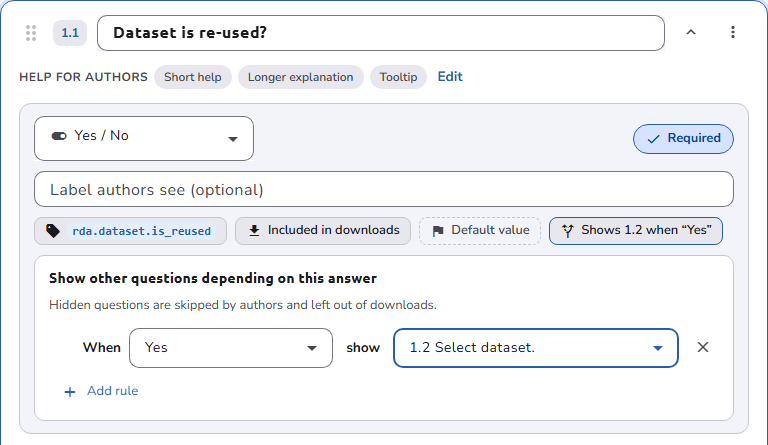
A question that is the target of several rules is shown when any of them is met. If the question holding the rule is itself hidden, the questions it shows stay hidden too.
Questions and inputs that cannot be a target stay in the list, grayed out, with the reason: the question that contains the input itself, another input in the same question, and a question that already shows this one, which would make each depend on the other.
Which inputs can drive a rule
Rules can be set on Free text, Text area, Rich text, Number, Yes / No, Single choice, Multiple choice, Tick box, and Date inputs. Inputs that link to other data, such as references, uploads, or tags, cannot drive a rule.
Seeing the rules
- A collapsed question summarizes its rules, for example Shows 2.3 when "Yes", and a conditional question says which answer shows it. On an expanded question, the Show a question when… chip of the input shows the same summary.
- In the outline, an icon marks the questions that control other questions and the questions that are conditional.
- The header counts the conditional rules of the whole structure.
- In the Review tab, the author preview applies the rules as you answer.
When you copy sections or questions, the rules inside the copy are kept, and rules that point outside it are dropped.
Preset fields cannot be conditional targets. Questions that contain a preset field, such as the asset Title, are not offered as targets. Preset fields are always visible.