Blueprints and asset templates
Your organisation prepares the forms you fill in. A blueprint sets out the sections and questions of a plan, and an asset template the questions of an asset. You choose a blueprint when you create a plan, and a template when you add an asset; you do not build them yourself.
To browse them, open Plan Blueprints or Asset Templates under Library in the sidebar (see Library).
Blueprints
A blueprint consists of one or more sections. A section can hold questions about the plan as a whole (such as its title, contacts, or funding), offer one or more asset templates so that you can add assets there, or both. At least one section of every blueprint accepts assets.
When you create a plan, the plan takes the sections of the blueprint you chose. The Select Blueprint step previews the blueprint section by section before you commit (see Create or edit a plan). To move a plan to another blueprint, start a new version of it and choose the blueprint there.
The plan questions include the plan's Title, Description, Language, and Access, often its Contact, references such as grants and organisations, and the same kinds of questions as asset templates.
Asset templates
An asset template defines the questions of one kind of output, for example a dataset, a piece of software, or a protocol. Its questions are grouped into sections, and every asset is based on exactly one template, chosen when you add the asset. Each asset also has its own Title, Description, and Tags.
Each blueprint section offers its own set of templates, and plan owners can add more from Manage templates (see Manage a section's templates). Once an asset is created, its template cannot be changed.
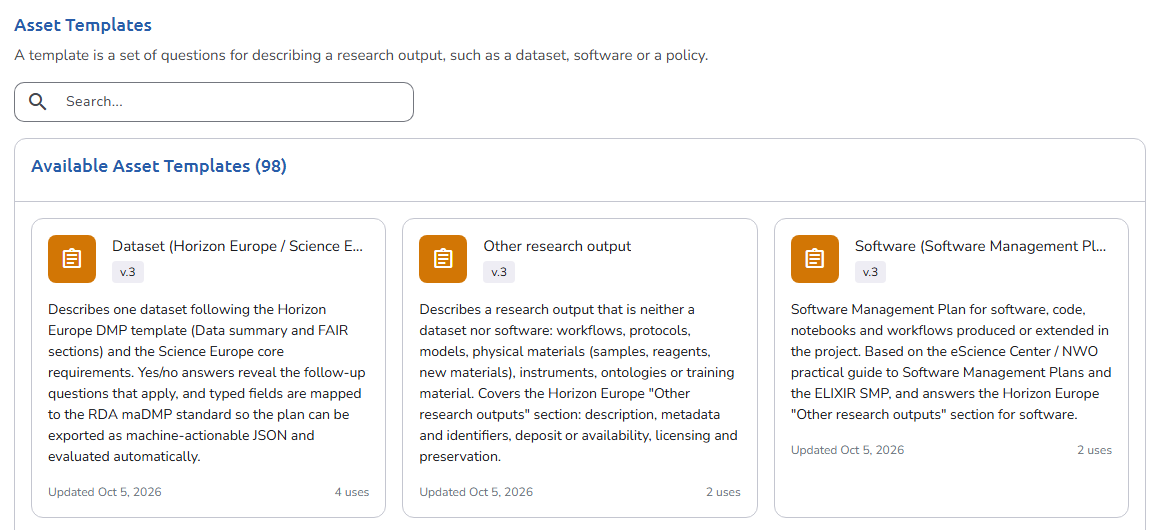 Asset Templates library
What the questions look like
Blueprints and templates use the same kinds of questions: text, rich text, numbers, dates, yes/no and choice questions, references, links to other plans or assets, and file uploads. Some questions take several answers, some appear only after a certain answer to another question, and some are required. See Fill in a plan for how each one behaves.
New versions
Administrators update blueprints and templates by creating new versions of them. When the template of one of your draft assets has a newer version, the editor offers to update the asset. When the blueprint of your plan has a newer version, the Plan overview says so, and you can move to it by starting a new version of the plan.
If no blueprint or template suits your project, contact your OpenCDMP administrator. How they are built is described in Plan blueprints and Asset templates in the administration guide.