Download a plan or asset
You can download the content of a plan, with all its assets, or of a single asset, as a file.
Which format?
| Format | In the menu | Use it to | Plans | Assets |
|---|---|---|---|---|
| Read, print, or send the plan to a funder or reviewer | Yes | Yes | ||
| Word (DOCX) | Document | Edit the text further in Microsoft Word or another word processor | Yes | Yes |
| RDA JSON | RDA JSON | Exchange a machine-actionable plan following the RDA DMP Common Standard with other tools | Yes | No |
| RAiD JSON | RAiD JSON | Share the project metadata in the RAiD format | Yes | No |
| XML | XML | Keep a complete copy in OpenCDMP's own format, for example to import it into another OpenCDMP installation | Yes | Yes |
The formats offered depend on how your installation is set up, so your menu may list fewer or more formats.
The PDF and Word downloads ask nothing and start straight away: their page size, date format, layout, and wording are set by administrators for the whole organisation.
Download a plan
- In the plan editor toolbar, the Download button opens the list of formats. It is disabled while the plan has unsaved changes (Save your changes first) or when the current status does not allow downloads.
- On the Plan overview page, Download is in the ... more actions menu. It is not shown when the current status does not allow downloads.
Choose a format to download the file. Whether a status allows downloads is set by your administrator on the plan and asset workflows.
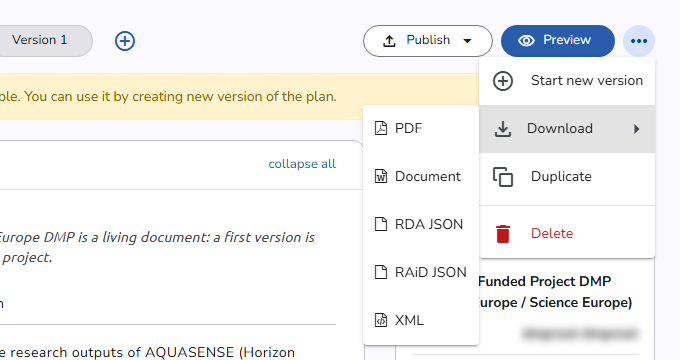 Download a plan
Download an asset
On the Asset overview page, open the ... more actions menu and choose Download, then the format. Every collaborator on the plan can download its assets, when the asset's current status allows it (see Plan & asset workflows).
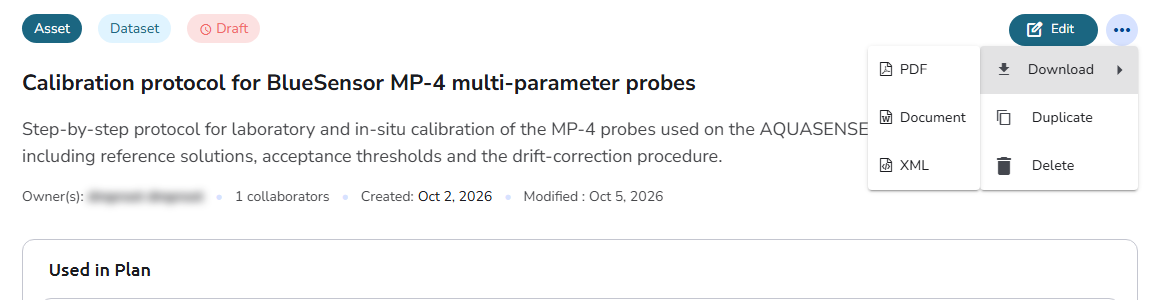 Download an asset
See also
- Publish a plan: publish to a repository and receive a permanent DOI
- Import a plan: create a plan from a downloaded XML or JSON file