Notifications
The Notifications page sets how people are told about events: which channels each notification may use, and which one is tried first.
Authorization
Open to the System Administrator and Organisation Admin roles. See Roles.
Navigation
Switch the sidebar to the Admin view, choose Settings under Organisation, then Notifications in the Communication group. See Organisation settings.
Channels
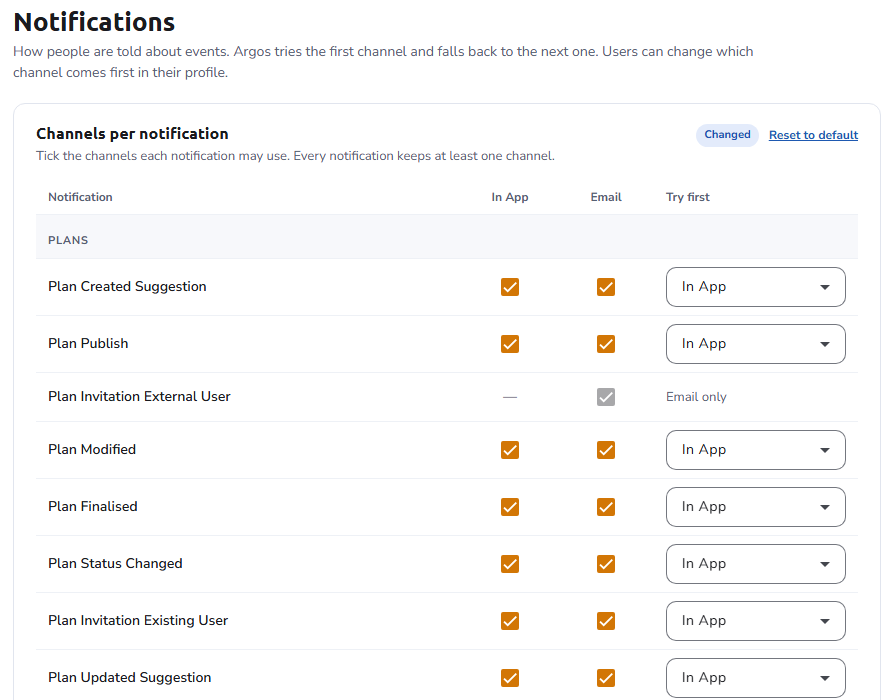
A table lists every notification, grouped by topic (Plans, Assets, Comments, Account, Support), with a column per channel, such as In App and Email:
- Tick the channels each notification may use. Every notification keeps at least one channel. A dash marks a channel the notification does not support.
- In the Try first column, choose which of the ticked channels is tried first; the platform falls back to the next one. A notification with a single channel shows it as only, for example Email only.
These defaults apply to all users of the organisation. Users can still choose which channel comes first in their profile.
See also
- Organisation settings - The settings hub, and how settings are saved
- Notification templates - The wording of every email and in-app message
- Email notifications - The notification service behind the channels