Who can see your plan
Who can see a plan depends on three separate things: the people you share it with, its Access field together with its status, and whether you publish it to a repository.
| Who sees it | How | |
|---|---|---|
| Collaborators | The people you invite, with the role you give them | Work together |
| Public plan | Anyone, including visitors who are not logged in and members of other organisations | Set Access to Public and finalize the plan |
| Published plan | Anyone who opens the repository record | Publish the plan to a repository and get a DOI |
Collaborators
A plan you create is visible to you and to the people you invite. Each collaborator has a role, such as Owner, Editor, Reviewer, or Viewer, which decides what they can do; some roles can be limited to specific sections. See Plan roles.
Organisation Admins and System Administrators can also see every plan of the organisation.
The Access field
Most blueprints include an Access question on the plan itself. Its label depends on the blueprint (for example Access Rights or Who can see this plan?), and it offers two values:
- Restricted Access: only the plan's collaborators (and the administrators above) can see the plan.
- Public: once the plan is finalized, anyone can see it.
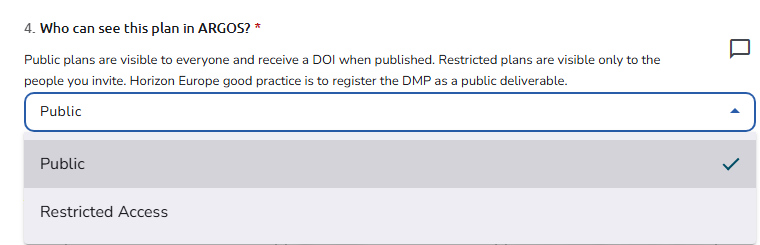 The Access question in the plan editor
The Access field has no effect while the plan is a draft: a draft plan is never public. Set it before you finalize, because a finalized plan can no longer be edited. To change it later, undo the finalization if your workflow allows it, or start a new version.
Public Plans and Public Assets
A plan that is both finalized and Public:
- is listed on the Public Plans page, and its finalized assets on Public Assets;
- opens in a public, read-only overview;
- is visible to visitors who are not logged in, and to members of every organisation in the installation, not only yours;
- is counted on the Dashboard that visitors see (see Dashboard for visitors who are not logged in).
Signed-in users can also copy a public asset as the starting point of one of their own (see Copy an existing asset).
Publishing to a repository
Publish sends a finalized plan to an external repository, such as Zenodo, and returns a DOI. It is separate from the Access field: publishing does not make the plan public in OpenCDMP, and a public plan is not published anywhere until you use Publish. The repository record has its own access settings, which you can review before you publish when the repository offers a review step. See Publish a plan.
What "publish" means where
The interface uses "publish" and "published" in different senses:
| Where | What it means |
|---|---|
| Publish button, Publish to menu, Already published | Depositing the plan in a repository to get a DOI |
| Published sort on Public Plans and Public Assets | The date the plan was finalized |
| The Finalise this item? dialog: it'll be published and be publicly available | The plan will appear on Public Plans, because its Access is Public |
| Import from a published resource, when you add an asset | Prefilling the asset from a record that already exists in an external source (see Prefill an asset) |
See also
- Work together: invite people and choose their roles
- Change status and finalize a plan: finalize the plan and undo the finalization
- Publish a plan: publish the plan to a repository and get a DOI